Insta360 Link 2, six months later
Work meetings and recordings on my Mac. A webcam that makes people ask what camera you're using.
Work meetings and recordings on my Mac. A webcam that makes people ask what camera you're using.
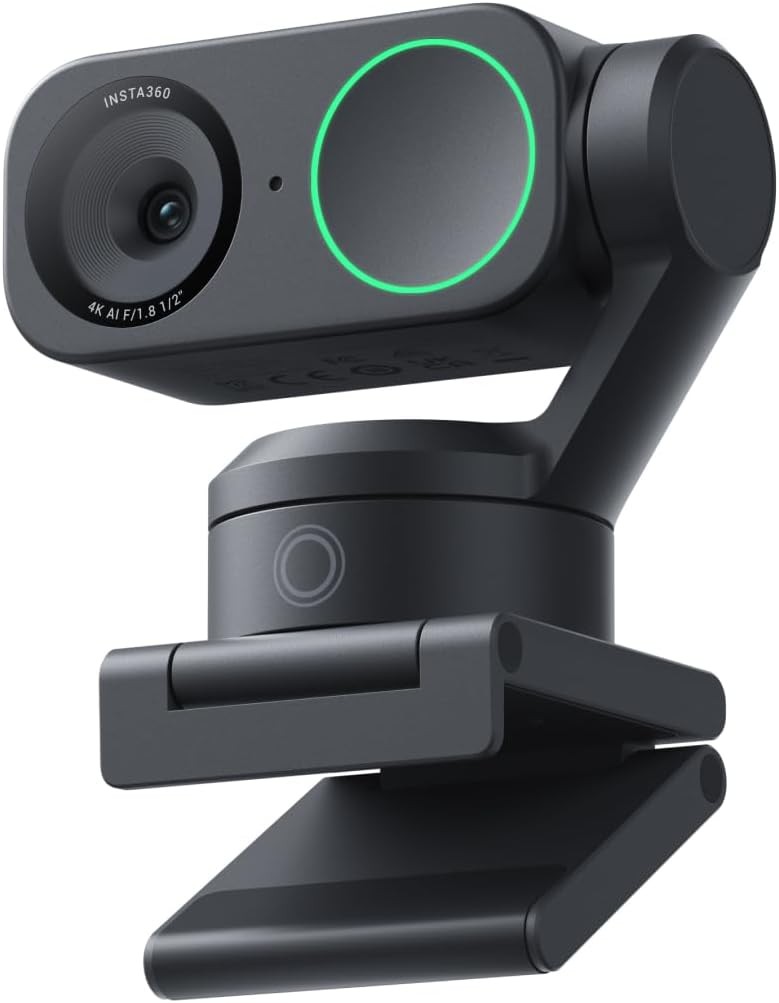
For about six months now, the Insta360 Link 2 has been sitting on top of my screen, plugged into my Mac. I use it every working day for meetings, and for recording videos. I bought it expecting a better picture than a normal webcam. What I didn't expect was how much the little gimbal and the smart features would change how I work on camera.
Short version: it's the best webcam I've used, and I don't say that lightly.
This is the first thing people notice. Colleagues have literally asked me what camera I'm using. The image is sharp, it records in 4K, and with HDR switched on, a bright window behind me doesn't blow everything out. Skin tones look natural, not orange or washed out the way cheaper webcams make you look.
Low light is where it really separates itself. Evening calls, a dim room, a single lamp on, and it still looks clean. That's thanks to a bigger 1/2-inch sensor and a bright f/1.8 lens, which is far more than most webcams have.
Colleagues have literally asked me what camera I'm using.
The camera sits on a small 2-axis gimbal, so it can physically turn and tilt to follow you. When I stand up, lean back or walk to grab something during a recording, it keeps me in frame. For recording videos this is brilliant, because I don't have to stay glued to one spot.
The gestures took me a day to get used to, and now I use them without thinking. Raise your hand and it starts or stops tracking, and you can zoom with a gesture too. It feels a bit like magic the first few times, and then it just becomes normal.
These two modes are underrated. Desk view tilts the camera down so you can show something on your desk: a sketch, a gadget, notes on paper. Whiteboard mode finds a whiteboard and straightens and enhances it so people can actually read it. For explaining things in meetings, both are genuinely useful, not gimmicks.
I honestly expected to keep using a separate microphone. I don't. The built-in mics sound clear, and the AI noise cancelling does a good job of removing background noise. There are three modes: Voice Focus, Voice Suppression and Music Balance. For meetings, Voice Focus is my default. People hear me, not the street outside.
It's plug and play over USB-C with my Mac. FaceTime, Zoom, Teams, everything recognised it immediately. The Insta360 Link Controller app is where you fine-tune things like tracking, modes and noise cancelling, and once it's set up, you rarely need to open it again.
Neither is a deal-breaker. The price is easier to accept once you realise you might not need a separate microphone. And for meetings and most recordings, 4K at 30 fps looks great. It's only for fast motion that I'd want 60.
| Sensor | 1/2" sensor |
|---|---|
| Lens | f/1.8, 26 mm equivalent, 79.5° diagonal field of view (67° horizontal) |
| Video | 4K at 30 fps, 1080p at 60 fps, HDR, landscape or portrait |
| Zoom & focus | Up to 4x digital zoom, autofocus from 10 cm |
| Gimbal | 2-axis (pan and tilt) with AI tracking |
| Smart modes | Gesture control, desk view, whiteboard mode, portrait mode, privacy mode |
| Audio | Built-in microphones with AI noise cancelling (Voice Focus, Voice Suppression, Music Balance) |
| Video formats | H.264 and MJPEG, 8-bit |
| Connection | USB-C |
| Weight | About 101.5 g (camera), 166.5 g with magnetic mount |
| Works with | Mac and Windows; Zoom, Teams, Google Meet, OBS and more |
| Software | Insta360 Link Controller |
Specifications from Insta360's support documentation and published reviews. Not to be confused with the Link 2 Pro, which has a larger 1/1.3" sensor.
If you spend a lot of your day on video calls, or you record yourself for videos and tutorials, the Link 2 is worth every cent. You look better, you sound better, and you're free to move. If you only join the odd call each week, a basic webcam will do the job for much less.
Six months in, it's the one piece of my desk setup that everyone on the other end notices. Pricey, but it earns it.
View the Insta360 Link 2 on Amazon ↗
— Desly